
The daily note that replaced my morning metrics crawl
A daily note in Obsidian, filled before I wake up with the four things I already checked every morning. How it is built, what goes in it, and the morning it caught a real error.
The daily note that replaced my morning metrics crawl
Every morning I used to open the same four places.
My blog analytics. My mailing list. Google Search Console. And the numbers for a book I wrote, on Amazon and Goodreads.
I’d check what changed since yesterday, close the tabs, and go make coffee. Three or four minutes, every day, in the same order. It wasn’t a big deal, but it was the first thing I did, and it was the same thing every time.
I didn’t build a daily report for a long time because most of the ones I saw felt forced. Someone would wire up an agent to send a daily email with a fun personality, or summarize the email inbox they already had. If you need an email to tell you which emails you have, the email isn’t the problem. I didn’t want another surface to check. I wanted one page with the four things I was already checking.
So I set up a daily note in Obsidian. One note, written before I wake up, that I read in about a minute.
What goes in the daily note
The note has six sections, always in the same order:
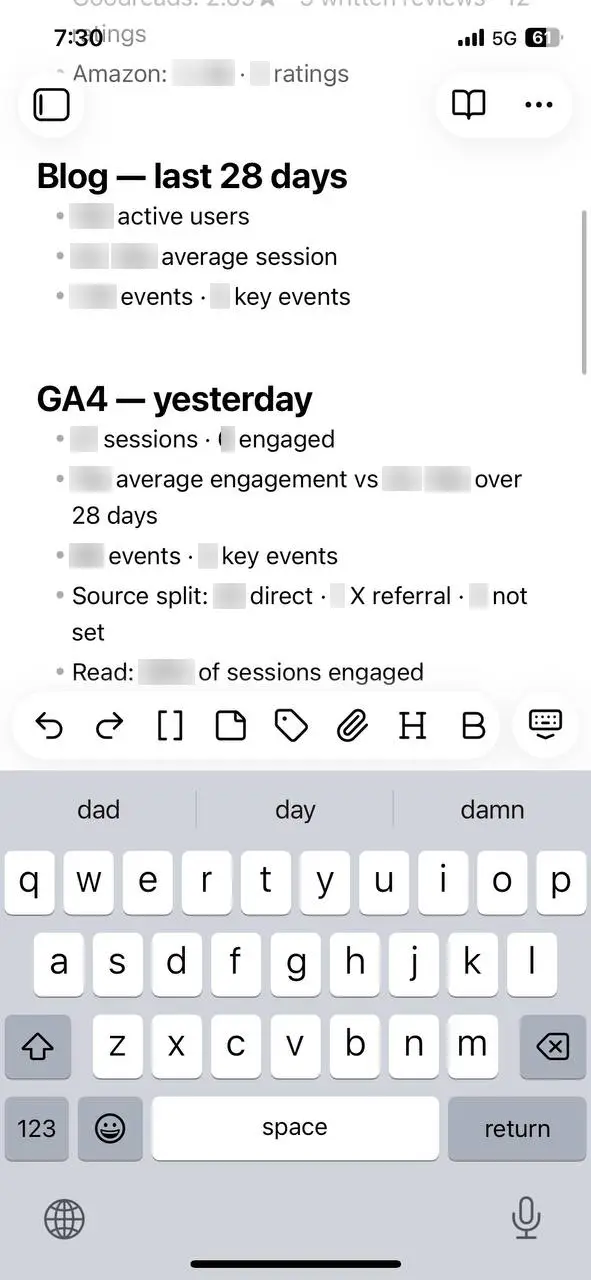
- Blog, last 28 days — active users, average session, events.
- GA4, yesterday — sessions, engaged sessions, average engagement, events, source split.
- Search Console, yesterday — clicks, impressions, CTR, average position against a baseline.
- Newsletter — subscriber count, the last join, joins today.
- Book — orders, royalties, KENP pages, the last payment; Goodreads rating and review count; Amazon rating and review count.
- Bottom line — one sentence. Usually “nothing needs action today.”
That’s it. Bullets, not paragraphs. No adjectives, no sentences restating the numbers. If nothing changed, the note says so.
If a source fails, the section says “unavailable” and names the source. It never guesses a number. A missing number is fine. A wrong one isn’t.
How I set it up
I didn’t start with a cron job. I did it in a chat window first.
I asked for one number: blog traffic. Then the subscriber count. Then Search Console. Then the book numbers. One at a time, so I could see whether each one was right.
Once I had the four pieces, I asked it to put them in one message as a short report. Then I adjusted the format until it was something I’d actually read in the morning: the six sections, bullets, no commentary.
After a few runs, I scheduled it to run at 5 a.m. and told it to add the note to my vault.
The prompt is a list of sources, a list of sections, and a few rules:
Pull KDP, Goodreads, Amazon, GA4, Search Console, and Buttondown.
Write the note to my vault with these sections, in this order:
Blog (last 28 days), GA4 (yesterday), Search Console (yesterday),
Newsletter, Book, Bottom line.

Bullets only. No adjectives. No restating numbers in prose.
If a source fails, write "unavailable" and name it.
Never invent a number.
How it gets filled
The job runs at 5 a.m. and pulls six sources.
Two are easy. Buttondown has an API, so the subscriber count is one request. Goodreads and Amazon don’t have a clean API for what I need, so the job fetches the pages with a normal browser user agent and reads the rating out of the markup.
KDP, GA4, and Search Console don’t give an agent a simple API for this. So the job uses OpenCLI to drive a browser: open the page, wait for it to load, read the table. The details are boring — check that the browser bridge is connected, bind a session, open the URL in a background window, wait a few seconds, evaluate the page. Once that path exists, any site I can log into is a source.
I don’t need the note to be real-time. I need it done before I start the day.
The morning it caught something
In November I moved my blog from kenmazaika.com and engineering.kenmazaika.com to notesfromtheloop.com. A lot of things moved at once, and one of them was Google Analytics.
One morning the GA4 section didn’t look right. The numbers didn’t match what I knew about the previous day. The stream wasn’t loading from the pixel after the move. I fixed the Analytics setup, and the next day’s numbers were correct.
I would have caught it eventually. The note is how I caught it.
If you want the next walkthrough by email, get the next post.
If you want to try it
Start with one source you already check. Get that number into a note. Then add the next one.
Use an API where the site has one. For the rest, use browser automation: log in, open the page, read the table. If your agent can drive a browser, the source list is basically anything you can see when you’re logged in.
Point the output at your Obsidian vault. The note can be a normal markdown file. Mine is the first thing I open on my phone.
It takes a minute, and I read it before anything else.