
What Does It Cost to Run an OpenClaw Agent? About $50 a Month
The OpenClaw agent bill, measured over 30 days: $50.93 for the normal setup — a $20 plan plus $30.93 of metered workhorse. The expensive month starts when premium routing or unattended jobs escape their own limits. I run the same workload on Hermes and see the same cost shape.
The short answer
Running an OpenClaw agent costs me about $50 a month. My normal operating setup was $50.93: a $20 ChatGPT premium subscription plus $30.93 of metered DeepSeek use.
That is the ongoing number I would put in a budget. It paid for heavy personal use: 19 published posts, 183 images, 142 PDFs, 285 sessions, and 8,658 tool calls from September 5 through October 5, 2026. The point is not that every month will land on the same 93 cents. The point is that $50 is a credible operating expectation when routine work stays on a plan-plus-workhorse route. That budget is also what makes it worth automating a repeated job — the kind of work I break down in Support Isn’t Tickets. It’s Loops.
I run both OpenClaw and Hermes, and these receipts come mostly from OpenClaw because that is where most of my day-to-day work runs. I see basically the same cost patterns on Hermes — the same cached-context discount, the same plan-plus-metered two-line budget, the same failure modes driving the overspend. The harness changes which model gets called. It does not change the shape of the bill.
I spent more than that during the same window. An optional Grok lane added $84.07, bringing observed model and subscription usage to $135.00. That did not disprove the $50 budget. It showed exactly what sits outside it: premium work I chose to route separately.
My evidence is one operating window, not a universal price; fresh-context workloads, heavier output, or different provider pricing will move the number.
Budget $50.93 for the recurring month
The useful monthly model has two lines, not one blended total:
| Cost line | Billing basis | Monthly budget | Job |
|---|---|---|---|
| ChatGPT premium | Subscription access | $20.00 | Primary route until the plan rate-limits |
| DeepSeek V4 | Metered usage | $30.93 | Workhorse fallback for the remaining volume |
| Normal operating setup | Plan + metered workhorse | $50.93 | The recurring number |
I already paid for the ChatGPT plan before I attached agent work to it. I still count it. “I already had the subscription” is useful cash-flow context, but it is not honest cost accounting if the plan powers the setup.
The $30.93 line is the one that expands and contracts with use. The $20 line buys access. Together they make a durable budget because the subscription handles the first part of the workload and a cheap metered model catches the overflow. I do not need every task to run on the most expensive model available; I need each task to land on a route good enough to finish it.
This post is about the bill that comes back next month, not the one-time setup.
If you’re thinking about trying an agent yourself, I put together five emails on the costs, models, and how I’d get started.
Why 1.75 billion tokens were not the cost center
The DeepSeek meter recorded 1.75 billion tokens across 14,347 requests and charged $30.93. The token count looks like the headline. It was not the cost center.
Most of that traffic was cached context. An agent repeatedly carries instructions, conversation history, and working material forward. When the provider can reuse that context, a cache read costs a fraction of fresh input. The model still reports a large number of tokens because it processed a large context, but the bill reflects how those tokens were served.
That distinction matters more than the raw total. “How many tokens did the agent use?” is not enough to forecast the next bill. I need to know how many were fresh input, cached input, and output, then apply the provider’s price to each category.
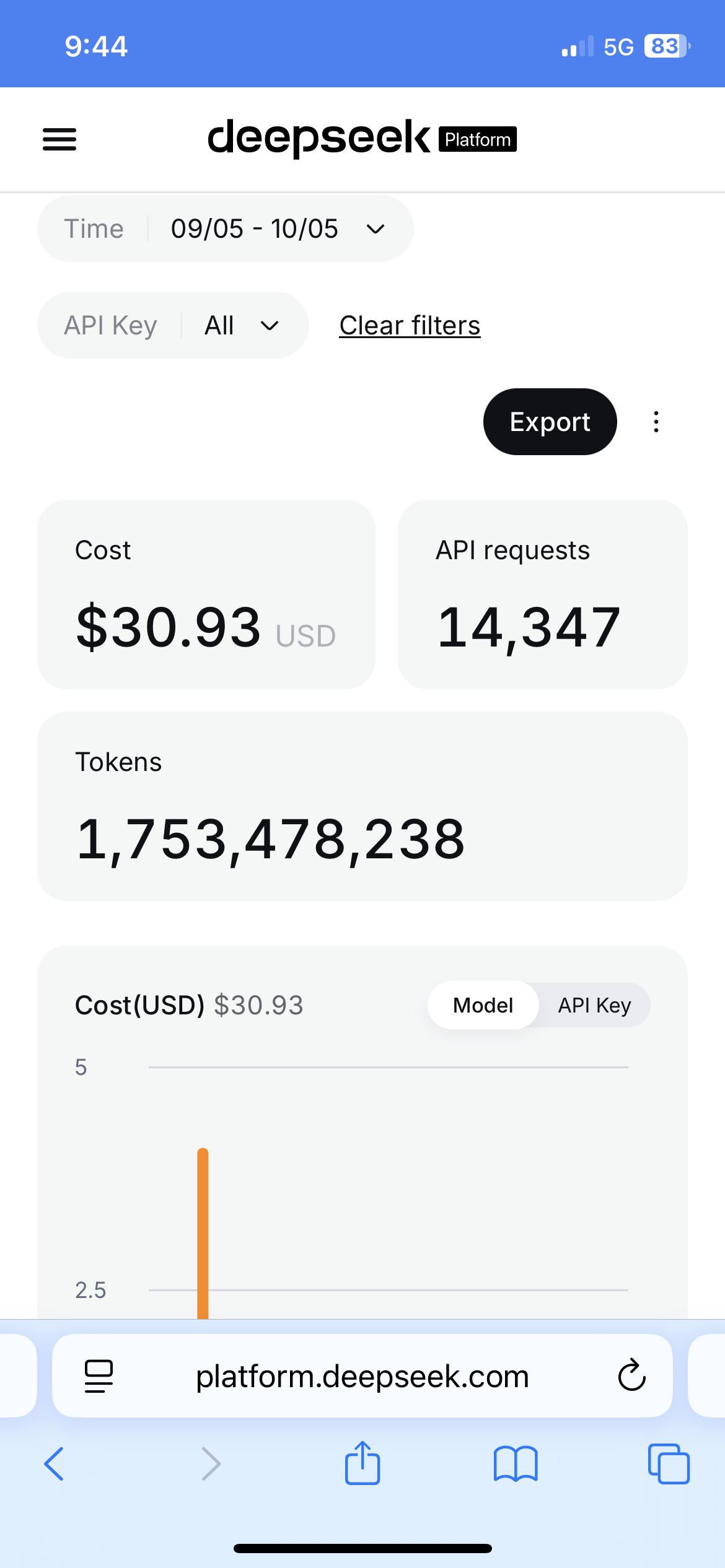 The DeepSeek meter for the September 5–October 5 window.
This is why the normal route can absorb substantial work and still stay near $50. Cached context makes repeated, context-heavy agent work cheaper than the top-line token count suggests. If I force fresh context into every turn, ask for much more output, or switch providers, I should expect a different result.
Price the route, not the model
“Which model do you use?” sounds like a pricing question, but it skips the decision that sets the bill. I price the route: which work runs on subscription access, which spills to the metered workhorse, which earns a premium lane, and which runs unattended. That same route is why a new model doesn’t rearrange my week — the rotation handles the release, not the budget.
| Work route | Meter | Budget decision |
|---|---|---|
| Routine interactive work | ChatGPT plan, then DeepSeek fallback | Included in the $50.93 operating budget |
| Image, search, reasoning, or prompt experiments where I want extra finish | Grok prepaid credit | Optional premium budget, kept separate |
| Scheduled jobs and retries | Whatever model the job calls | A multiplier that needs its own limits |
The harness is not the useful unit of cost here. The same agent can call a cheap workhorse for one task and a premium model for the next. One name on the chat window can hide three billing streams.
Keeping those streams separate also makes the monthly number legible. Routine capability cost me $50.93. Premium experimentation cost another $84.07. Calling the whole thing “a $135 agent” would hide the choice I can turn off next month.
Two things moved the bill
The first was premium routing. I used $84.07 of prepaid Grok credit for image and design experiments, web and X search, reasoning, and prompt work. That lane was not required to keep the agent useful. I opted into it when I wanted more polish or wanted to test a different route.
That is a clean budget decision. Give premium work its own cap, and the normal operating number stays visible. Mix it into the workhorse meter, and a month of experiments starts masquerading as the price of basic capability.
The second mover was work nobody was watching. Cron generated 222 million tokens across 167 runs and 19 jobs. Three jobs accounted for 77% of that traffic. Concentration that sharp tells me exactly where to look first.
One retry storm ran 11 times, spent 8.4 million tokens, and produced zero qualified leads. The job kept selecting the same failed offset after every timeout. It was not doing eleven units of work; it was buying the same failure eleven times.
I saw the same failure shape in an image revision loop. With auto-recharge enabled, it generated three $10 receipts in twenty minutes while producing cosmetic variants. The provider did what I asked. My control was wrong.
Premium routing is an explicit choice. Unattended work becomes an implicit choice unless I bound it. Those are the two paths from a $50 operating month to a $135 observed month.
Three controls keep the number bounded
I use three controls before adding more agent work:
- Turn auto-recharge off. A drained prepaid balance forces a decision. Automatic top-ups let a bad loop keep converting mistakes into charges.
- Cap loops and advance failures. Every retry path needs a limit, and a failed unit needs to be marked tried before the job moves on. Otherwise a stuck cursor can repurchase the same failure indefinitely.
- Review unattended jobs monthly. Sort scheduled work by tokens, then check whether anyone read or used the output. High-volume jobs deserve inspection; unread jobs deserve deletion or a smaller schedule.
These controls do not make the workload free. They make the budget behave like a budget. I can see the normal route, choose a premium allowance, and stop background work from silently consuming either one.
How much does it cost to set up a production environment?
This post is the bill that comes back. The question before it is what it costs to stand up a machine that runs the agent 24/7 in the first place. How much does it cost to set up a production environment for this? For me, about $175, once — a used desktop with no GPU and no local models. The full getting-started setup is here: The $175 Production Box I Use to Run an AI Agent 24/7.
The monthly budget I would use
For capable, heavy personal use, I would start with $50 a month: $20 for plan access and about $30 for a cached, metered workhorse. I would not bury premium experiments inside that number. I would give them a separate prepaid cap and decide whether the extra finish earned the extra money.
Then I would audit scheduled work as its own route. The danger is not that an agent occasionally uses a lot of tokens. My 1.75 billion-token month shows why that number alone can mislead. The danger is paying premium prices by habit or letting a job repeat after it has stopped advancing.
The recurring number is credible because its boundaries are visible. $50.93 bought the normal operating setup. $84.07 bought an optional premium lane. The gap between them is not mystery spend. It is a routing decision I can make again next month—or decline.
FAQ
How much does it cost to run an OpenClaw agent each month? I would budget about $50 a month for capable, heavy personal use. My normal OpenClaw operating setup was $50.93: a $20 ChatGPT premium subscription plus $30.93 of metered DeepSeek usage.
Why did 1.75 billion tokens cost only $30.93? Most of that traffic was cached context. Cache reads cost a fraction of fresh input, so the raw token total looked enormous while the metered bill stayed small. The token counter is not the bill.
Is Hermes cheaper or more expensive to run than OpenClaw? I don’t see a fundamental difference, and I would be skeptical of anyone who claims otherwise with a straight face. I run both. These receipts were primarily driven by the cost of my OpenClaw, because that is where most of my day-to-day work runs. When I ran my Hermes agent over a comparable window I saw basically the same cost patterns: the same cached-context discount, the same plan-plus-metered two-line budget, and the same failure modes driving the overspend. The harness changes which model gets called. It does not change the shape of the bill.
What makes the bill exceed $50 a month? In my month, two movers: an optional premium lane, and unattended work. Grok experimentation added $84.07. Scheduled jobs and retry loops could keep spending after the output had stopped being useful.
How do you keep an agent bill bounded? Three things: turn auto-recharge off, cap loops and advance failures, and review unattended jobs monthly by tokens and by whether anyone read the output.