
Support Isn't Tickets. It's Loops.
Automate customer support by treating it as loops, not tickets — the anatomy, the economics, and how to start with a harness like OpenClaw or Hermes.
Most support teams say they have a ticket problem. They have a loop problem.
A ticket is one trip. A loop is the thing that keeps making tickets: the same question, the same failure mode, the same back-and-forth, arriving forever from every direction. Answer faster and you’re just running the loop by hand with more urgency. The leverage is in the loop — and once you can see the loops, most of them don’t need a human inside.
I learned this running support at a company I co-founded — the Firehose Project, an online coding bootcamp. It’s one instance of a pattern that shows up everywhere; let me use it to show you the shape, then get to what it takes to actually start.
The loop I ran by hand
We were twelve people, and support was baked into everyone’s job. At our peak, four of us carried it: about 25 hours a week for me, 20 for one teammate, 15 and 10 for two others — call it seventy hours a week at a twelve-person company, helping students who were building apps and had gotten stuck.
The most common ticket, about four times a week: a student creates a database migration, edits the migration file, runs the migration — and then saves the file. The migration already ran against what was on disk at that moment, so the change never took effect, and the app throws an error that looks like it’s about something else. The fix is two commands: roll back, run it again.
Getting there was always the same five steps: find the student, clone their code, reproduce the error, find where it actually broke, explain why. And then the part everyone forgets when they say “AI will handle support” — if there’s a lesson in it, teach it, so they find the bug themselves next time.
That sequence is a loop, and it isn’t specific to a bootcamp. Swap the details — a billing question, a bug report, a shipping delay — and the shape is the same in every company.
The support loop
Here’s the loop I mean (Figure 1). Requests arrive from every angle — an email, a ticket in the queue, a chat message — carrying the same kinds of asks. Then a fixed sequence: triage (understand it) → answer → teach → refer to a runbook or known pattern → close, or escalate. And the step everyone skips is the return path: learn — write it up, so the next one is easier.
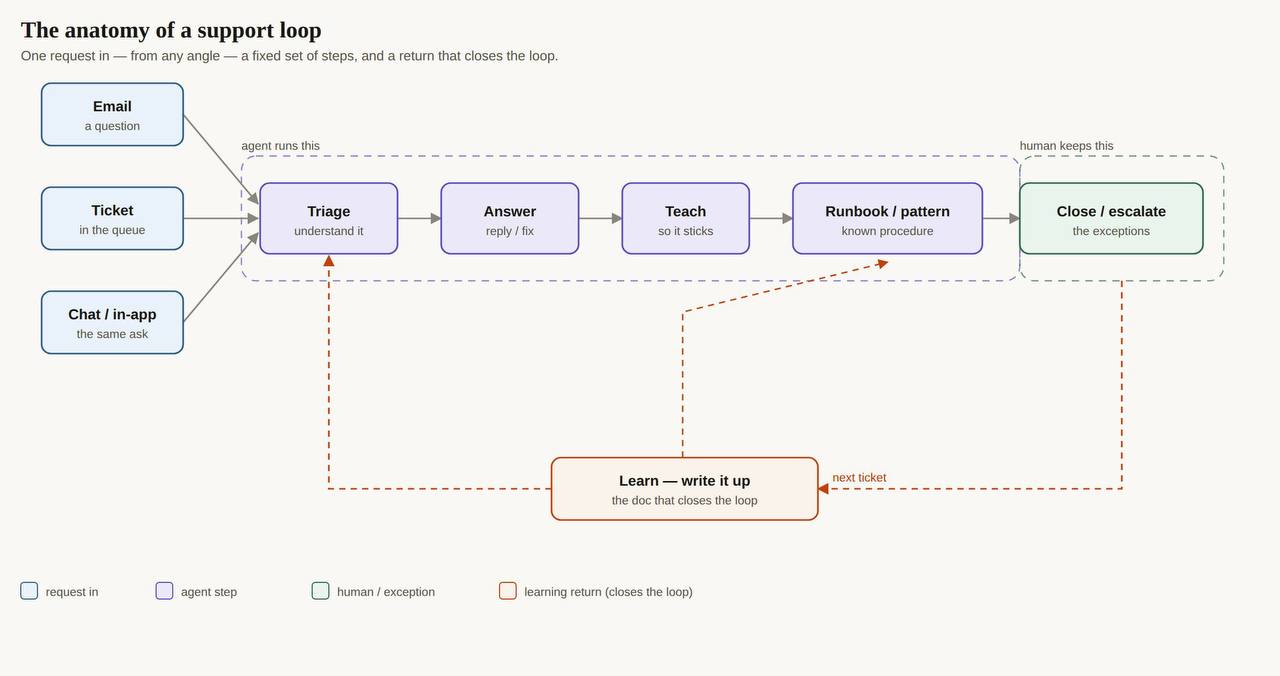
Two things fall out of drawing it. The steps across the top are repetitive and rule-shaped — a machine can run them. The right edge is judgment — the novel case, the angry customer, the high-stakes call — and a person should keep it. Support, seen this way, is a loop with a human bolted onto the exceptions.
If you want to try this on your own queue, I put the starting path into five emails — costs, models, and the first workflow.
Support is loops, not tickets
To check that this wasn’t just my one company, I pulled twenty real support and customer-success job postings and clustered the responsibilities. Fifteen recurring duties fell out, in four families: a case loop (intake → triage → resolve → escalate → close), a learning loop (cases → patterns → docs → upstream → fewer cases), an account loop (onboard → monitor → renew), and a system loop (set standards → staff → inspect → change the tooling). The most common duty on the list wasn’t answering anything — it was improving the workflows and tooling. The job is loops all the way down.
Firehose’s five were one instance of that set: onboarding and mentor matching, group-project scheduling, the “get unstuck” debugging loop, a lighter free-user tier, and the extension requests from a program people kept pausing. The names change company to company. The loops don’t.
What today’s tools actually sell
The AI support market sells resolution, not loops.
I went through fourteen platforms. Every one promises to resolve tickets, and the good stuff is priced per resolution, per session, or per outcome — often on top of a per-seat fee. That’s a real product and a real help. It’s also the wrong unit: a resolved ticket is one trip through the loop, and behind it the loop keeps running.
The metric is squishy, too. Vendors quote containment — the share of conversations that don’t escalate to a human — because it flatters. But containment counts a frustrated customer who gives up the same as one who got the right answer. On the same conversations, one analysis found 72% containment but 52% resolution. Gartner’s version: vendors claim around 65% self-service “resolution,” while only about 14% of customers say their issue was actually resolved. And the four hard seams stay open: the context outside the ticket, the hand-off to another system, the novel case, and the confident wrong answer.
We tried the crude version of this once. A little bot watched every request for the one thing we usually needed — a link to the student’s GitHub — and asked for it when it was missing. Two problems. Half the requests had nothing to do with a project on GitHub, so it demanded a field that made no sense, and people handed it over anyway. And when someone typed their username instead of the URL, the check fired again: “I already told you what my GitHub is.” The rule was right; the reading was blind. A check that can’t tell when it applies doesn’t save a round trip — it adds one.
Loop engineering, in one sentence
There’s a name for the fix, and it isn’t “prompt engineering.” Loop engineering is designing the system — the trigger, the action, the verification, the state, and the stop rules — that runs an agent over and over on your behalf, instead of you prompting it turn by turn. You stop sitting inside the loop and start building it.
The ticket is the thing you handle. The loop is the thing you engineer.
The loop, actually closed
So I ran the experiment. I pointed an agent at a real, open bug report on a public project — a function returning a value outside the range it was given — and let it run the loop I used to run by hand.
It reproduced the failure (a thousand runs, every one out of range). It read the source and found the cause in a single branch that added a random fraction without scaling it to the window. It proposed the fix, verified it across a thousand runs and two regression windows, and wrote the entry for the knowledge base. Start to finish, no human in the seat.
That’s the “get unstuck” loop from Firehose, running itself, on a ticket nobody wrote for me. The write-up is what closes the loop; it’s the thing that stops the next ticket from ever being asked.
Why it beats pasting into ChatGPT
You might say the customer can just paste the error into ChatGPT. Sometimes they can. Two problems.
The first is context. The agent pulls from the person’s actual account — their repo, their code, the exact error — and reasons about their situation instead of a pasted fragment. That’s the difference between “here’s how to fix a migration” and “here’s what happened in your migration.”
The second matters more. A generic chatbot fixes the bug its way, and if the person is working through a curriculum — or a process your business depends on — that fix can conflict with the next step; it answers the question and breaks the workflow. The agent that knows the whole system fixes it on the rails. And it holds a line a chatbot can’t: explain the first time, but when someone repeats a mistake we’ve already taught, make them think — “what do you think happened?” That’s the difference between a loop that makes people better and one that makes them dependent.
The economics
A human-handled support ticket runs about $15.56 in North America (MetricNet’s figure, per ticket); an AI or self-service resolution runs $0.10 to $2.00 (per resolution). A knowledge base that gets maintained cuts ticket volume by 20–50%.
Firehose’s loop was seventy hours a week. The model tokens to close one of those tickets cost less than the coffee that got me through the morning block. The money was never the tokens. It was the hours — and the context-switching that ate the rest of the day.
The ceiling
We got better at this. We built runbooks, copy-paste replies, a Google Doc of answers. Support got easier and it scaled — from ten customers to a hundred. It did not scale past that. A runbook is a human reading a page and applying it; that works until the volume outruns the humans. To go from a hundred concurrent customers to a thousand to ten thousand, a runbook isn’t going to do it — you’re back to hiring, and the loop grows faster than the team. An agent is what scales to that: not because it’s smarter than your best support person, but because it runs the loop every time — without getting tired, without context-switching, and without needing the runbook to be a person.
What runs the loop
Everything above has been talking about the loop. This is about the thing that runs it — and here’s where the picture has changed.
A loop needs six things to actually run on its own: a trigger (the arriving request), the tools it acts with (the repo, the database, the docs), memory and state that survive between runs, a schedule so it doesn’t need you to start it, verification that the action worked, and stop rules — including who has to approve an action that leaves the building.
The old way to get those six was to assemble them: an orchestration tool for the trigger and the plumbing, a vector store for the memory, a scheduler, a pile of custom glue to hold it together, and a queue for the human approvals. You spent your engineering time wiring the choreography between the pieces, and the loop itself was what was left over.
A harness like OpenClaw or Hermes collapses those six into one thing. The harness is the orchestration: it holds the loop’s state, calls the tools (through a standard interface like MCP, so new integrations are plug-in rather than bespoke), remembers across sessions, schedules its own runs, checks its work, and gates the actions that need a human. There’s no separate layer to choreograph — you describe the loop, and the harness runs it. That’s the shift: your effort moves from plumbing the pieces together to designing the loop itself.
To be clear about what this is: a harness is a support-engineer’s tool. It sits beside your helpdesk rather than replacing it, the integration work is still yours, and anything customer-facing stays behind an approval gate. What it changes is the amount of glue you have to write to get a loop off the ground.
What it costs to run
Two numbers make this cheaper than it sounds.
The hardware first: you don’t need anything special. Mine runs on a used desktop I bought on Facebook Marketplace for $175 — an old PC doing work that used to need a data-center contract. (Here’s the exact box.)
The running cost: the harnesses are open source, and the tokens are cheap when you route to the low-cost lane. Pointed at a Chinese model like DeepSeek, running this kind of work lands around $50 a month — for heavy use, not a demo. (Here’s the full bill.)
So the barrier isn’t money or hardware. It’s deciding which loop to hand over first.
How to actually get going
You don’t start by writing a clever prompt. You start by getting your data moving.
Look back at the loop (Figure 1). The top row is the entry points — every place a request lands: the support inbox, the chat widget, the ticket queue, the DMs, the form. Write them down; there are usually more than you think, and seeing them in one list is most of the insight.
Then point a harness at them. Connect it to the entry points you listed and let it ingest what’s already coming in — the tickets, the threads, the conversations, the repeated questions. You’re not automating anything yet; you’re giving the agent the raw material your support team works from every day.
That’s the step where the loops stop being abstract. Once the data is in front of the agent, the same questions surface over and over, and the shape from earlier in this post is right there in your own traffic: which loops are high-frequency and rule-shaped, which ones are genuinely new every time. The common ones are the ones to hand over first — let the harness run them, keep the judgment calls for the human, and attach a runbook to everything you hand off. From there, the next step is usually obvious, because you’re no longer guessing where the work is; you can see it.
We never had that. We had a Google Doc and a queue. The reason this is worth doing now is that the six things a loop needs are no longer a project — they’re the thing you point at your entry points on a Tuesday afternoon.
What I’d tell the CTO I was
Support looks like a cost center and a fire to put out. It’s a set of loops, and most of them don’t need a human inside.
Find the loop you hate most. Write down its steps — trigger, retrieve the context, act, verify, know when to stop and hand off, and learn from the close. Then build the loop instead of running it. You’ll still work the exceptions; that’s the job. But you’ll stop working the loop — and that’s the difference between putting out fires and keeping yourself out of trouble.
If you want to stop running the loop by hand: the recommended next step is to get started with a harness like OpenClaw or Hermes. Point it at one of your support entry points and let it close one loop end to end — you’ll learn more from that than from any amount of planning.