
OpenClaw Tutorial: Build Your First Automation, End to End
Your first hour shouldn't go into channels, cron, and plugins — it should end with one automation you built and understood. Every prompt to get there, in order.
You finished Quick Start. OpenClaw is installed, a model answers, there’s a workspace on disk. Then you sit at an empty prompt with a features page open in the next tab — channels, cron, memory, plugins — and no idea which one matters first.
One thing to keep in mind before step one: you drive this with prompts. Every step below is a sentence you type. The agent does the work behind it — it picks the feed, writes the parser, hits the API — but the sentence is yours, and that’s the whole relationship. The first hour is where you feel it.
So the goal for the hour isn’t to configure anything. It’s to build one automation, start to finish, and understand every part of it. Mine watches AI-model chatter on Reddit and keeps a board of the claims. The domain doesn’t matter; the shape does.
What you’re actually learning
You have an hour. It’s not for wiring up configuration — it’s for getting the key concepts. You can absolutely get those in an hour, and this project takes about 20 minutes of it. The rest of the hour is you understanding what just happened.
Treat it like programming, because it is. The habit you already have is: get something working once, then codify it, then layer the next piece on top of it. Building blocks, smallest first, each one sitting on the one before. That’s exactly the sequence below — pull data, shape it, push it, make it repeat, put it on a cron.
What’s different is what the blocks are made of. In code you specify how. Here you describe what, in plain text — and the actual programming language goes opaque. You say what you want the computer to do; you don’t manage how it figures it out. That’s the magic of it, and the first hour is where you feel it.
The shape has five parts
Many automations you’ll ever build are these five:
- A source that changes. Mine: r/openclaw and r/hermesagent — people posting hands-on reports, cost complaints, and hype about whatever model just shipped.
- A judgment. A rubric the agent applies, so “worth watching” isn’t a vibe.
- A destination. Somewhere that outlives the session. Mine: an Airtable table.
- A reusable form. The same steps, saved as a skill.
- A schedule. That skill on a cron, so it runs without you.
Swap the source, the rubric, and the destination and you have a different automation. The shape doesn’t move.
If you want a structured path from here, five emails cover the first automation, models, and costs.
Before you start
Start after Quick Start gives you a working chat — installation is its own variable runway of sign-ins and downloads, and it isn’t hour one. You need a working chat, the default workspace, and a free Airtable account. Nothing else. No channels, no cron, no plugins. That’s on purpose.
A note on the prompts below. They’re typed the way I actually typed them — mixed case, no polish, a typo or two. Yours don’t need to be cleaner than that. The agent is reading intent, not grammar. If you want them genuinely better, ask an AI to write them for you: describe what you want, ask for the prompt, then use that. That’s its own technique — Meta-Prompting: Let the AI Write Your Prompt. You don’t need it for the basic setup here. It earns its keep later, when you’re tuning the parts that are actually hard.
Step 0 — Ask for a plan first
Don’t open with a request for data. Open with a request for a plan:
I want to watch what people are saying about new AI models in r/openclaw and
r/hermesagent, and keep a running board of the claims. Walk me through how you'd
do it, step by step — what you'd pull, how you'd judge it, where the output goes —
and write it up as a PDF I can read before we build anything.
What comes back is a real plan — mine landed as a short PDF, and it looked good: an approach, a source, a destination, and a list of what it needed from me. The part worth noticing is what the plan says it will do. It goes and loads data from a couple of different places, and one of them is an RSS feed. That’s the whole trick of the first block already sitting in your plan, in writing, before you’ve done anything.
You read the plan. You approve it, or you change one line.
You: two sentences describing the goal. Agent: a written plan, a proposed source, a proposed destination, and its list of open questions.
Do this every time. You don’t always know the right approach and the tool usually does. Getting a written plan you can approve — before a single write — is the habit that scales to every job after this one.
Step 1 — Load the data and look at it
Now start small — and notice this isn’t a separate chore. It’s the first block of one process that runs to the end of the post.
Pull the 20 most recent posts from these two feeds and show me what you get:

https://www.reddit.com/r/openclaw/new/.rss
https://www.reddit.com/r/hermesagent/new/.rss

For each post, print the title, the author, the date, and the first few lines of
the body, as a numbered list.
Public RSS feeds — no login, no Reddit API application. That’s the point of starting here: the plan found an unauthenticated way to get the data, and now you’re watching it get wired up. The agent picked the feed format, fetched it, parsed it, and printed rows into your chat window.
Read the rows. This is the part that teaches you what the tool is for. You asked for “recent posts,” it went and got them in the format you gave, and now that data is sitting in the agent’s pocket where it can do something with it.
You: one sentence and two URLs. Agent: picked the feed format, fetched it, parsed it, printed the rows.
What mine actually returned — a real pull, Sep 22, 2026 (25 posts per feed). Each row is title · author · date · first lines of body:
r/openclaw — Arguing with my openclaw /u/basitmate 9/22 · The more I use OpenClaw; the less I understand /u/willwork4pii 9/22 · GPT Live as native model? /u/coccoinomane 9/21
r/hermesagent — Moving desktop → server /u/fttklr 9/22 · Benchmarking Hermes for personal use /u/thatscoolbutno123 9/22 · Local AI on a 5070ti is killing me /u/Previous-Ad-5371 9/22
Four of the twenty were image posts with no text — flagged, not guessed. Skim it: nearly all of it is setup talk and “hello, I’m new” posts. That’s what the next block is for.
Step 2 — Shape the rows (this is the judgment)
Now take the same data and transform it. This is the step people skip, and it’s the reason the result is yours and not a generic summary. Tell the agent exactly what a claim is:
Now turn those posts into claims — one row per claim. Three rules:

1. Only keep claims about a model. Strip the setup chatter, the harness opinions,
   and the routine "X is my default model" mentions. If you can't tell whether
   it's a positive or negative read of a model, drop it.
2. Keep the verbatim sentence, plus a one-line summary, and the post URL on every row.
3. If a post argues both ways, split it into two rows — one positive, one negative.

Show me the rows before you write anything anywhere.
Left on its own, the agent will invent rules for you. Don’t let it. It writes the code; you set the standard.
You: defined “claim” and the three rules. Agent: applied them to every post and handed back the rows.
What mine actually returned. 50 posts in → 8 claims out. The full row looks like this:
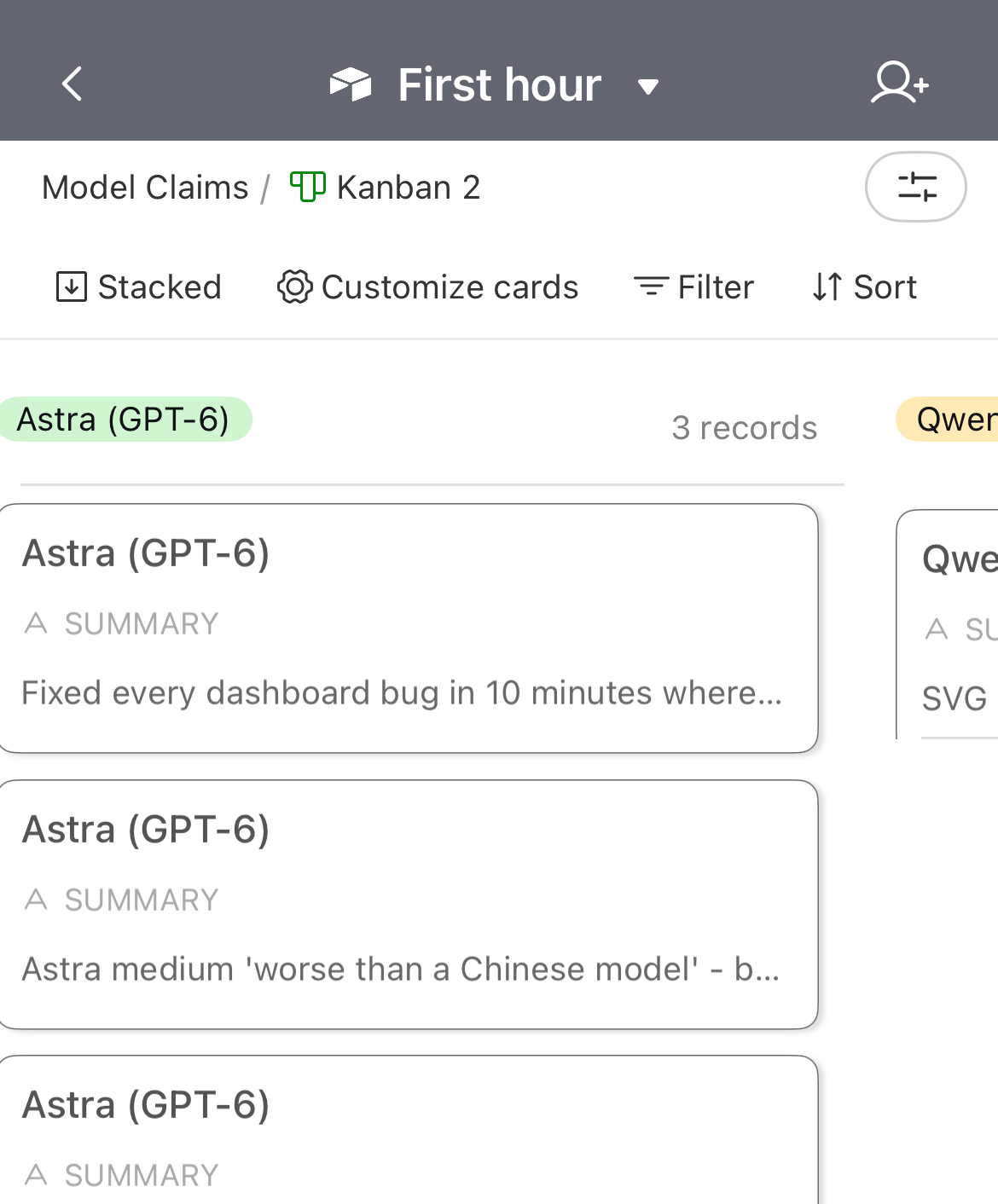
Jev — Positive Summary: Reranking memory candidates fixed bad embeddings — top-5 relevance 24.3% → 42.9%. Verbatim: “Jev reviews all 20 candidates in about 1.1 seconds and scores them.” Source: r/openclaw · https://www.reddit.com/r/openclaw/comments/1wkscnj/
The other seven, one line each:
GPT Live (gpt-live-1-codex) — Positive — built-in chat feels remarkably smooth Gemma 4 (e4b) — Negative — won’t act agentically; asks permission constantly Gemini — Negative — as a memory gate, “the results were a disaster” ChatGPT 5.4 / 5.5 — Negative — burns tokens fast on Plus DeepSeek Flash — Negative — no longer cheap Luna — Positive — expected to cover ~90% of needs Qwen3.6 35B (Q5) — Positive — works well at ~210K context for network tasks
Forty-two of the fifty posts produced nothing — no model named, or no read either way. Rows 5–7 are one post that carried three separate claims. That’s the rubric working, not the agent failing to find things.
One thing worth sitting with: nothing here was “programmed.” You wrote five lines of plain text about what a claim is, and the transformation followed. That’s the opacity paying off.
Step 3 — Push it into a destination you can see
A chat scrollback is not an output. Push the rows somewhere you can open tomorrow — and now the three blocks start to look like one process instead of three tasks.
I used Airtable, for practical reasons: it’s API-driven, the API is easy, the schema is flexible enough to hold whatever you throw at it, and setup is intuitive. It isn’t the only choice and it isn’t a catch-all — you won’t reach for it for everything — but it’s a great first destination because you can look at the result.
Writing to it needs a key. Here’s the whole thing.
Get the token — about two minutes:
- Go to
airtable.com/create/tokens. - Create a token. Name it something like
openclaw-first-hour. - Add the scopes
data.records:read,data.records:write, andschema.bases:read. - Under Access, add the base you’re writing to.
- Copy the token. It starts with
pat.
Put it where the agent can read it — yourself. Open your TOOLS.md file and add it by hand:
## Airtable
- Base: First hour (appCfMRzCMMi0uVHs)
- Table: Model Claims
- Token: patXXXXXXXXXXXXXX
Yes, you could paste the token into chat and tell the agent to save it for you. It would. Don’t — and the reason is security, not convenience: a token in a chat log is a credential sitting outside the file you control. Typing it into the file yourself takes two seconds, and it’s how you learn that the file exists, what it’s for, and where the secret lives. Leaving it in a plain file is fine while you’re building the integration and learning how it works. Once you understand how it works, move the key into something like Bitwarden so it’s actually secure.
Now hand over the write:
ok now push these rows into airtable. base "First hour", table "Model Claims".
one row per claim: Model, Sentiment, Summary, Full Claim, Post. make Model and
Sentiment single-select so i can group the view. use the token in my TOOLS.md.
show me the plan before you write anything.
Then open the board and check it yourself. Mine: 38 claims across 28 models, every row linked to its post. If a row is missing its source, or the summaries are vague, your rules from Step 2 were too loose. Tighten them and run it again. The board is only worth keeping because you can check it.
You: made the token and wrote it into the file. Agent: read the file, wrote the rows, reported back.
Step 4 — Make it a skill
You did it once by hand. Now codify it — same building blocks, made repeatable:
now turn this into a skill so i can run it again on purpose. same steps, same order.The agent writes the steps into a skill file and walks you through the approval: you see what it’s going to do, you approve it, and now “pull claims and push them to the board” is a thing you invoke instead of a conversation you re-explain.
Run it once as a skill and confirm you get the same board — no duplicates. Then open the file it wrote. Here’s ours:
---
name: model-claims-radar
description: Pull recent model chatter from r/openclaw and r/hermesagent, extract one claim per row,
  and push it to the Airtable "Model Claims" table. Keyed and no-op safe.
---

# Model Claims Radar

## When to run
On demand, or daily to keep the claim board current.

## Steps
1. Fetch the new-post feeds:
   - https://www.reddit.com/r/openclaw/new/.rss
   - https://www.reddit.com/r/hermesagent/new/.rss
2. For each post, extract claims with the rubric: model-only; verbatim claim kept;
   one-line summary; post URL on every row; both-ways posts split into two rows.
3. Write to Airtable base "First hour", table "Model Claims":
   Model | Sentiment (Positive/Negative) | Summary | Full Claim | Post | Subreddit | Claim Key.
   Claim Key = hash(model + post + summary).
4. Create and update only. Never delete. Re-running the same data is a no-op.
5. Report rows created / unchanged, and the board link.

## Token
Airtable PAT, read from TOOLS.md.
Yours will be a little different — your fields, your wording — but it’ll have the same shape: the source, the rubric, the destination, the no-op rule. Reading your own skill file is the difference between “I can do this” and “this is saved.”
You: asked for the skill and approved it. Agent: wrote the file and ran it once to prove it repeats.
Step 5 — Put it on a schedule
Last block, and the one that turns a chore into infrastructure:
put that skill on a cron so it runs every morning at 7.Done. The board now updates while you’re doing something else. The first morning it runs on its own, go look at what showed up. That’s the moment the shape clicks: a source you chose, a judgment you set, a destination you can read, running on a cron.
You could skip all of this
An experienced person reading this runs zero steps. They paste the post — or just the Step 0 plan — into OpenClaw and say “do this.” It will.
So why read along?
Because the day it breaks — and it will — the person who said “just do it” has no idea what “it” was. Run the steps once and you know where the data came from, where it went, which token it used, and which file to open when a row looks wrong. You can fix it, or you can tell the agent exactly what’s broken.
That’s the difference between owning the automation and renting it.
Your move
Pick a source that changes and that you already care about. Ask for the plan. Load a few rows and look at them. Set the judgment. Push them somewhere you can see. Codify it as a skill. Put it on a cron.
One hour, one automation, and the shape you’ll use for everything after. For choosing which repeated job deserves that hour, the case I’d hand you first is support: Support Isn’t Tickets. It’s Loops.